
Excel Process Automation
Eliminate manual spreadsheet bottlenecks with automated Python pipelines or institutional-grade native Excel engineering.
Excel is the universal language of finance, until fragile linked workbooks and manual copy-pasting become operational risks. Whether you need to migrate mission-critical spreadsheets into automated Python/SQL pipelines or engineer high-performance native Excel dashboards that run inside strict IT environments, we eliminate the manual grind.
What we automate & engineer
Excel to Python & SQL pipeline migration
Translate brittle VLOOKUPs, nested formulas, Power Query steps, and legacy VBA macros into fast, version-controlled Python and SQL pipelines.
Advanced native Excel dashboards & network graphs
When IT lock-downs require staying in Excel, we build zero-dependency interactive dashboards and network topology graphs using native shapes and optimized VBA.
Automated multi-workbook consolidation
Programmatically ingest, validate, and merge dozens or hundreds of survey or branch Excel submissions into a single clean dataset in seconds.
Automated formatting & Excel report generation
Generate pixel-perfect, multi-tab `.xlsx` workbooks with dynamic formulas, conditional formatting, and institutional styling directly from Python.
Row-by-row parallel validation & reconciliation
During migration, we verify automated outputs against your legacy spreadsheets cell by cell so nothing breaks in production.
Scheduled unattended execution
Replace Monday-morning manual refreshes with scheduled jobs that validate data, generate workbooks or PDFs, and distribute them automatically.
Featured Dashboards & Case Studies
Real production deliverables engineered for global financial regulators, institutional risk teams, and capital markets organizations.
Counterparty & Transaction Network Graph Dashboard in Excel
A complete network topology visualizer, circular/force layout engine, and counterparty exposure scorecard built 100% natively in Microsoft Excel.
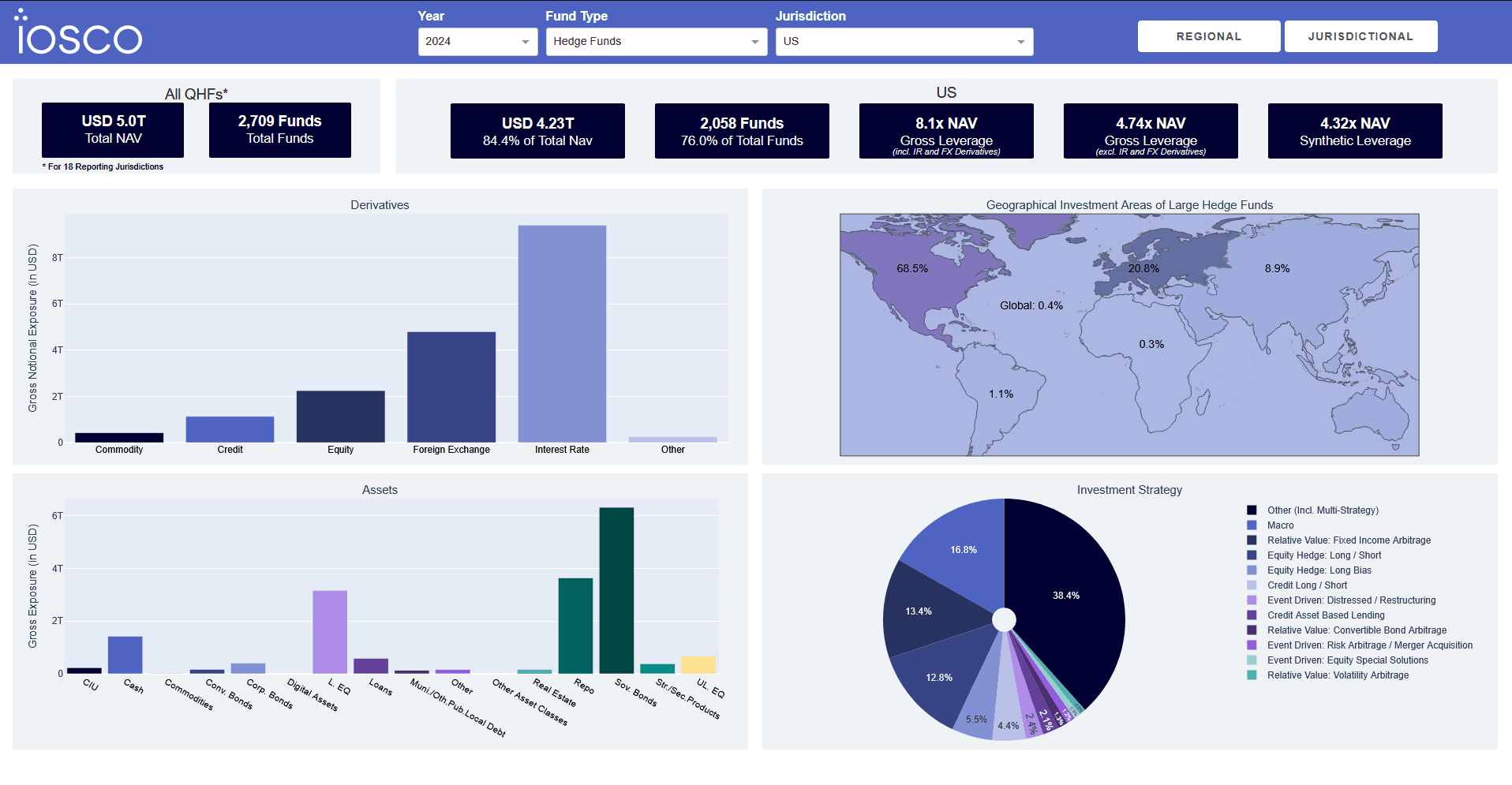
IOSCO Multi-Jurisdictional Survey Consolidation
Automated ingestion and interactive validation of cross-border regulatory Excel templates covering ~85% of all global investment funds ($72.5T NAV), improving reported data quality by 40% as jurisdictions easily discovered issues in submitted information.
Who this is for
- Finance, risk, and operations teams spending hours every week updating linked Excel workbooks
- Regulated institutions where strict desktop IT policies require advanced analytics to run natively inside Excel
- Organizations where a single broken formula or corrupted macro threatens regulatory or board reporting
- Survey and compliance coordinators collecting and reconciling dozens of standardized Excel templates
- Teams ready to bridge legacy spreadsheet workflows into modern Power BI or Plotly Dash dashboards
Why Data Sense
Deep mastery of both Excel and Python
We do not dismiss Excel. We build interactive native Excel dashboards, network graph engines, and enterprise Python pipelines, choosing whichever fits your constraints.
Incremental, zero-downtime migration
We automate in parallel and reconcile outputs cell-for-cell against your existing workbooks before retiring manual steps.
Full code ownership & documentation
Your team receives clean, documented Python scripts or unlocked, well-structured VBA modules with zero black-box dependencies.
Frequently Asked Questions
What Excel workflows can be automated with Python?
We automate recurring financial reconciliations, multi-workbook survey consolidations, complex macro-driven models, pivot-table report packs, and formatted `.xlsx` / PDF distribution. If your team repeats the same spreadsheet steps every week or month, it can be automated.
Can you build advanced interactive dashboards directly inside Excel without third-party plugins?
Yes. For environments where security policies block third-party add-ins or cloud BI tools, we engineer high-performance native Excel dashboards: including interactive counterparty network graphs, force-directed layouts, and dynamic scorecards: using pure Excel shapes, named ranges, and clean VBA.
How do you migrate complex Excel logic to Python without introducing errors?
We audit every formula, named range, Power Query step, and VBA routine, translate the logic into modular Python/SQL, and run automated regression tests comparing the new output against your historical Excel files row by row until they match 100%.
How long does an Excel process automation project take?
A single recurring workflow or custom native Excel dashboard typically takes one to three weeks. Multi-source enterprise consolidations with automated validation and PDF/BI outputs typically take four to eight weeks.
Ready to talk?
Tell us about your data challenge and we'll show you exactly how we'd approach it. No obligation.
Get a Free Consultation →